What's new in Screensaver Factory 5?
The new Screensaver Factory is designed to save your time and to give you better results than ever. Version 5 is the reflection of our and our customers' latest and the most sophisticated ideas brought to reality for taking your screensaver development experience and results to the next level once again.
Click any item to learn how the new features can improve your results:- New look and feel
- Stunning display effects
- Much much smoother effects even on huge screens
- Improved setup system
- Support for digital signing
- Photo frame effect
- New sizing option – Resize to fill screen
- Auto-resize big images to create compact screensavers
- RSS feed reading
- Transparent PNG image support
- Calendar and clock features
- Auto updates for your screensavers
- Silent install
- Automated screensaver builds
- Better compatibility and readiness for the future
- Over 100 other improvements and fixes
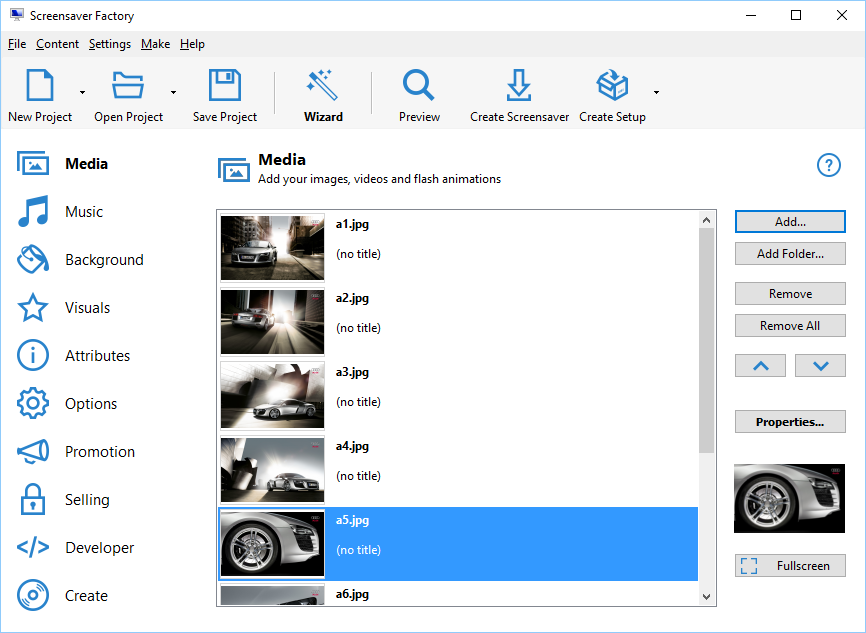
New look and feel
Work faster and accomplish more. The new Screensaver Factory interface is inspiring, up to date and easier to use than ever before.
Stunning display effects
Make your still slideshow screensavers so much cooler by adding constant movement. The new display effects will make your pictures slowly and smoothly slide or rotate and zoom. This feature is exclusive to Screensaver Factory and it is really cool. Download a sample screensaver.
Much much smoother effects even on huge screens
Make your screensavers look smoother and cooler. The transition effects are now rendered using a completely new technology which ensures that the effects are totally smooth even on big screens with very high resolution.
Improved setup system
Updated installer interface will make your screensaver product look modern and up to date with the latest Windows user interfaces.
Support for digital signing
Digitally sign your screensaver product to avoid the disturbing yellow Windows User Account Control warning screen and replace it with a legitimately looking Continue screen.
Photo frame effect
Create amazing photo-album screensavers by turning on the new photo frame effect and combining it with other effects, such as rotate and zoom and grayscale.
New sizing option – resize to fill screen
Create screensavers that work full-screen both on regular and wide screens without exposing the background or changing the aspect ratio. This is achieved by cropping the images just a little bit to make sure the screen is filled completely. Download a sample screensaver.
Auto-resize big images to create compact screensavers
Save time with the built-in smooth image scaling feature that comes in handy whenever you need to create a screensaver from very big source images, such as those recorded by modern digital cameras. No more need for resizing the images manually to optimize them for use in a screensaver.
RSS feed reading *
Create picture slideshow screensavers that read and display information from a single or multiple RSS feeds. Show the news boldly at the center of the screen or unobtrusively in a corner – it is up to you.
Transparent PNG image support
Transparent PNG image support lets you expand your creativity and create screensavers that display pictures with transparent or half-transparent areas. Transparency is also supported for logo images.
Calendar and clock features *
Easily turn your screensaver into something practical by displaying a stylish clock or calendar directly on your screensavers. Easily create cool-looking specialized clock and calendar screensavers. Choose from various clock and calendar styles.
Auto updates for your screensavers *
Make screensavers that can automatically update themselves by download new images, flash or videos from your website. Of course, this will require your users to have an internet connection and you to implement and maintain the technology and content.
Silent install
Screensaver setup packages now support silent setup via command line. This enables easy remote deployment of your screensaver product over large computer networks.
Automated screensaver builds *
Screensaver Factory can now be used to generate screensavers automatically via command line. This enables application developers to build systems that create screensavers without displaying the Screensaver Factory interface. Click here to learn more.
Better compatibility and readiness for the future
Create faster and more compatible screensaver products than ever before. Latest version has been tested with all kinds of Windows® systems, including the upcoming Windows 7®. Be ready for the future with the latest version of Screensaver Factory.
Over 100 other improvements and fixes
Besides the major new features and improvements, there were lots of other changes made to improve your experience and the output quality so that you can create the very best screensavers.
* This feature is available only in Professional or Enterprise editions of the product.